

There are some cool features in the E71 which takes time and patience to discover. I get surprised every now and then with the features available. I will be highlighting in series which would be categorized under discoverE71.
The first post is going to be about the dictionary that comes installed on the E71. The dictionary can be accessed from Options –> Office –> Dictionary. All the people I know including myself were not aware of this powerful application till I read the post on Nokia Tips which was written by Martain Spierings. However, I found that this post had missed some of the powerful and useful features.
The features of the dictionary on the E71 are
- The dictionary is available in English and other native languages including Afrikaans, Arabic, Bulgarian, Hindi, Italian, Polish and Urdu amongst others. You find the whole list of available dictionaries at http://europe.nokia.com/get-support-and-software/download-software/mobile-dictionary. You can also access this page via the phone to download the pictures directly to your phone.
- The dictionary is specially helpful to those whose native language is not English as the dictionary application also allows users to get the translation of a word in English. For this to work you need to download the language pack of your language.
Once you have downloaded the other language pack you need to set the source as English and the target and as your native language (see screenshot below)


using translation in the dictionary for E71
- The dictionary also has a pronunciation built into it. Once you have the word selected which you want the pronunciation for click options –> listen and voila! (screenshot below) the phone gives you the pronunciation.
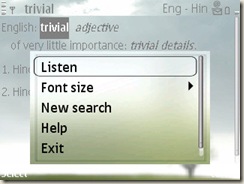
What’s more you can adjust the pronunciation by going to options –> speech. On the next screen you can adjust the voice of the speaker, how fast the word is read and the volume( see the screenshot below)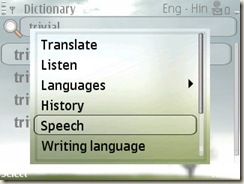
- History of all the searches you have done till date is available
The dictionary is loaded with features and its features did surprise me. One of the feature that is missing is the ability to add words to your dictionary.
I thought sharing the information about the application would surprise a lot of readers as well. It will be nice to hear reactions from the readers.




